I have 18 tips to help you shoot stunning July 4th fireworks photos using your camera or your smartphone at this 250th Independence Day celebration.
 On Saturday, the U.S. will celebrate Independence Day, commemorating the ratification of the Declaration of Independence by the Second Continental Congress on July 4, 1776, in Philadelphia, Pennsylvania, 250 years ago. It was adopted and signed in the Pennsylvania State House, now called Independence Hall.
John Adams set the tone for all July fourth celebrations.
In his July 3, 1776, letter to his wife Abigail, John Adams created the plan Americans follow today for celebrating Independence Day. He said that the day should be,
“…solemnized with pomp and parade, with shows, games, guns, bells, bonfires and illuminations from one end of this continent to the other from this time forward forever more.”
The Pennsylvania Evening Post described the first Independence Day anniversary in Philadelphia, July 4, 1777,
“The evening closed with the ring of bells and at night there was a grand exhibition of fireworks (which began and concluded with thirteen rockets) on the Commons and the city was beautifully illuminated.”
In that tradition, on this July 4, at the steps of the Philadelphia Museum of Art, aka “Rocky steps,” Philadelphia will hold the One Philly Unity Concert for America. The concert will feature Christina Aguilera, Jill Scott, The Roots, Will Smith, DJ Jazzy Jeff and more. If you’re in the region for the holiday, visiting America’s birthplace, you might look for me among the projected 300,000 in the crowd, but toward the end I’ll be sneaking out to one of the surrounding high rise buildings to photograph the fireworks following the concert, where my photography gear will be ready to go.
You must understand that fireworks are extremely bright and last for several seconds to successfully photograph them.
To successfully photograph fireworks, you must understand that fireworks are extremely bright and persist for several seconds before fading. Against an almost black background of the night sky, the contrast between the fireworks and sky exceeds the dynamic range of typical digital camera sensors. Therefore, focus and exposure settings for fireworks photography must be well thought out.
If you’re anywhere in the U.S. for the holiday this Saturday and want to get great images of the fireworks near you, here are my top fireworks’ photography tips for both digital cameras and smartphones.
Preparation is key. Scout your location, arrive early, precharge your battery and have plenty of memory space.
Scout for a location and choose wisely:
Fireworks draw large crowds. Find a position where people won’t wander in front of you and accidentally knock into your equipment. Choose an upwind location from the fireworks to avoid their smoke, which can obscure your images. Avoid unwanted light from street lamps. Consider the setting’s background. Beware tree branches that could intrude into your photo.
Arrive early:
To be able to claim the great spot you scouted, arrive early. Make a few test photos to ensure nothing unexpected shows up in your images, like a light or branch.
Start with a fully charged battery:
You don’t want to run out of power before the end of the show.
Have enough free memory:
I typically take photos of every fireworks’ burst. I format the largest memory card I have, so it’s at full capacity in my camera. For smartphones, consider off-loading as many photo and video files as possible, so you have plenty of room for shooting the fireworks.
Set your photos with the highest quality setting, daylight white balance, flash off and frame the scene well.
Use the highest quality setting for your photos:
I shoot fireworks exclusively in RAW format. If your smartphone has a RAW capability, use it. If you take your photos in HEIF or JPG, choose the best quality and the largest size (least compression) to avoid compression artifacts, which often occur in images like fireworks with high luminance and color contrast.
White Balance:
Set your white balance to daylight.
Frame your photo well:
The best orientation for your fireworks images depends on your scene as a whole. To grab the Air Museum as my background, I’ll be using a landscape format. If you’re in a field, a vertical format may be best to ensure you capture the full upward rocket trajectory and bursts. Regardless, frame your image so you have a reasonably sized foreground and “head-room” above the topmost fireworks’ bursts. Your position relative to the fireworks display will determine your optimal lens focal length.
Turn off your flash:
Your flash is useless for photographing fireworks; however, if you’re trying to light something in the foreground to give your photo context and extra interest, then turn on the flash for only that and be sure that the flash isn’t pointed up.
Add a foreground subject:
Consider adding a statue, crowd silhouettes, a tree or a building in the foreground for context and interest.
Use a tripod and a remote shutter release.
Always use a tripod:
Whether you’re shooting with a camera or smartphone, fireworks’ photography requires long exposures to capture both light trails and full fireworks’ bursts. That requires camera support to ensure sharp images. Use a tripod appropriate for your equipment.
Use a remote shutter release:
Minute movements of your camera or smartphone can blur your images. When using either, use a remote shutter release, if possible, to avoid shake caused by pressing the shutter release button. Most cameras accept wireless or wired remote shutter releases. For iPhones, if you have an Apple Watch, you can use it as a remote shutter release with several apps such as Halide Mark III, which I recommend below.
Use manual focus, low ISO, smart aperture, long exposure and disable HDR.
Use manual focus:
The fireworks will likely be several hundred yards/meters away or more. It’s difficult to focus in darkness, so focus manually and set it to infinity. For cameras or smartphones that don’t have manual focus, use landscape mode to approximate it.
Chose a low ISO setting for your photos:
To minimize digital noise in your fireworks’ photos, use a low ISO setting of 50–200.
Base your aperture on your ISO setting:
A good starting point would be ISO 100 – f/8 to f/16 or ISO 200 – f/11 to f/22 on your camera. On smartphones you’ll need to experiment to find the best exposure value (EV). Check your photos as you shoot and adjust the aperture or EV as necessary.
It’s night, but you don’t need extremely long exposures:
Fireworks are very bright. Set your camera to manual exposure mode. I expose my fireworks’ photos from 1 to 4 seconds to capture the trail(s) and burst(s). If your camera or smartphone app has a B (Bulb) shutter setting, you can use it for long exposures. Anticipate the beginning of the burst and open the shutter. Close it immediately after it reaches its peak.
Disable your Smartphone’s HDR:
High Dynamic Range (HDR) can sometimes hinder the capture of the colors of the fireworks.
Get a great camera app for smartphone and an LED headlamp.
For smartphones get a camera app that allows manual shooting:
Fireworks’ images are best made when you can set your smartphone camera’s exposure settings manually. Most camera apps that come standard on smartphones have limited manual capability or don’t have it at all. For Android, consider Camera FV-5 ($4.99). For the iPhone, I use Halide Mark III ($19.99 annual subscription). Both of these apps provide extensive manual control to make great fireworks’ photos.
LED red headlamp to see:
If you need to see what you’re doing while shooting, use a red LED headlamp to not affect your photos or eyes.
Have a blast shooting fireworks Saturday on July 4th.
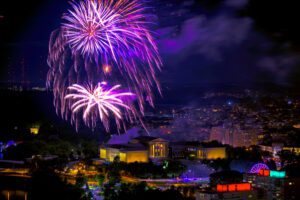
(Image: Philadelphia Welcomes America, Independence Day celebration, on the Parkway at the Philadelphia Museum of Art Copyright © 2023 NSL Photography. All Rights Reserved.)
READ ALSO:
Airline competition keeps airfares low — that’s why airlines hate it
Why you might want to splurge for preferred or premium economy seats

After many years working in corporate America as a chemical engineer, executive and eventually CFO of a multinational manufacturer, Ned founded a tech consulting company and later restarted NSL Photography, his photography business. Before entering the corporate world, Ned worked as a Public Health Engineer for the Philadelphia Department of Public Health. As a well known corporate, travel and wildlife photographer, Ned travels the world writing about travel and photography, as well as running photography workshops, seminars and photowalks. Visit Ned’s Photography Blog and Galleries.